
FINISH YOUR RIG · ACCESSORY GUIDE
Mounting a Stream Deck on your sim rig.
Match the enclosure to your device, choose a sensible reach and keep the controls clear of the wheel and shifter.
Affiliate disclosure: shopping links may earn me a commission at no extra cost to you. This is a product-selection guide, not a hands-on review of every accessory shown.
5% off selected SSG products
See offer details and accessory picks →
Start with your exact Stream Deck
A Stream Deck is useful only if you can reach it comfortably. Before choosing an enclosure, identify the device on your desk: the original 15-key model, MK.2, XL, Mini or a dial-equipped Stream Deck +. The housings, cable positions and button layouts differ. An enclosure that looks close in a photo may still be the wrong part.
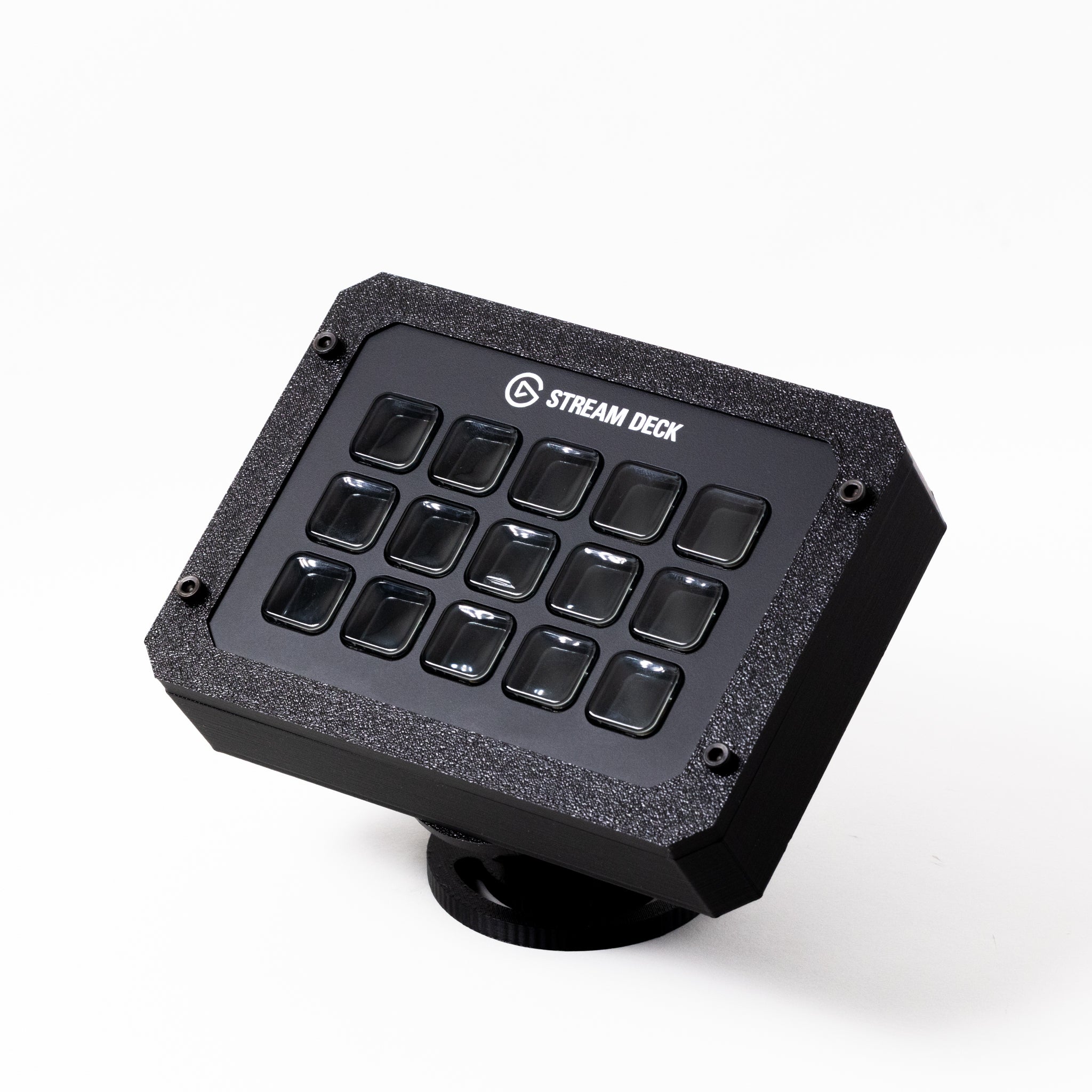
SSG’s 15-key adjustable enclosure has MK.1 and MK.2 choices. Its current V2 listing offers a standard mount and 3-inch or 6-inch premium arms. The XL and Stream Deck + have their own listings. Choose the device version first, then decide how it should attach to the rig.
If the device already sits securely within reach, you may not need a new mount. A bracket is worth considering when reaching for controls pulls your shoulder away from the seat, the desk stand moves when pressed, or the cable hangs across a moving part.
Direct mount or swivel arm?
| Arrangement | Why choose it? | Measure first |
|---|---|---|
| Direct profile mount | A compact location close to the cockpit upright. | Whether the buttons remain reachable and the attachment suits the extrusion. |
| Short swivel arm | More freedom to change the button angle or bring the controls closer. | The complete device and arm envelope beside the wheel and shifter. |
| Longer swivel arm | Reaches around another component or spans a larger gap. | Clearance through the full adjustment range and movement when pressing buttons. |
More reach is not automatically better. The farther a device sits from its mounting point, the more leverage your finger applies to the arm. Use the shortest arrangement that puts the controls where you need them. Confirm how each joint locks rather than assuming it will stay put under repeated presses.
Position it from the driving seat
- Set your driving position first. Seat, wheel and pedals should be where you use them. A bracket positioned from outside the cockpit can feel very different once you are strapped in.
- Mock up the location. Use a cardboard outline of the device to check reach. Keep frequently used controls close enough to press without leaning forward.
- Check wheel and shifter clearance. Consider hands on the wheel, paddle movement and the shifter’s full travel. Do not position an enclosure where your fingers could strike it.
- Keep an exit route. Check the space needed to enter the rig and move the seat. A swing-away arrangement only helps if you can move and secure it easily.
- Check the USB connector. Leave room behind the device for the plug and a relaxed cable bend. Do not rely on tension in the cable to hold the device in place.
After installation, test the buttons while parked in the sim before driving. Recheck the joint fasteners if the device changes angle. Software profiles and game support are separate from the mechanical mount; an enclosure does not add integrations by itself.
A mount to compare
15-key adjustable enclosure
For the compatible 15-key Stream Deck variant. Compare the standard attachment with the optional premium arms; match MK.1 or MK.2 before ordering.
View options at SSG ↗The photo shows SSG’s product, not an installation on my current rig. Check whether your chosen option includes only the enclosure and mount or any additional hardware.
Finish the cable route
Route the USB lead along the arm with enough slack for the positions you actually use. Secure it to the fixed cockpit after that moving section so an accidental pull does not go straight into the device socket. Avoid sharp bends and leave the joint adjustment accessible.
If several controls meet at a USB hub, label their leads before tidying the bundle. Test every device before concealing the wiring. A clean-looking installation is not a success if you cannot disconnect one accessory without unravelling the whole rig.
My sim rig cable-management guide covers clips, hub mounting and service loops. For the cockpit itself, start with the ASR PRO Gen 2 build guide.
Your SimSportGadget code
Sources & product details
Product options checked 19 October 2026. Confirm the current listing and follow the manufacturer’s installation instructions for the parts you receive.